Subscribe, manage & cancel
Upgrading takes about a minute and the payment itself is handled entirely by Google Play — Dooit never sees your card or UPI details. This guide walks through buying a plan, getting it back after a reinstall, switching plans, and cancelling without losing days you have already paid for.
Upgrade, step by step
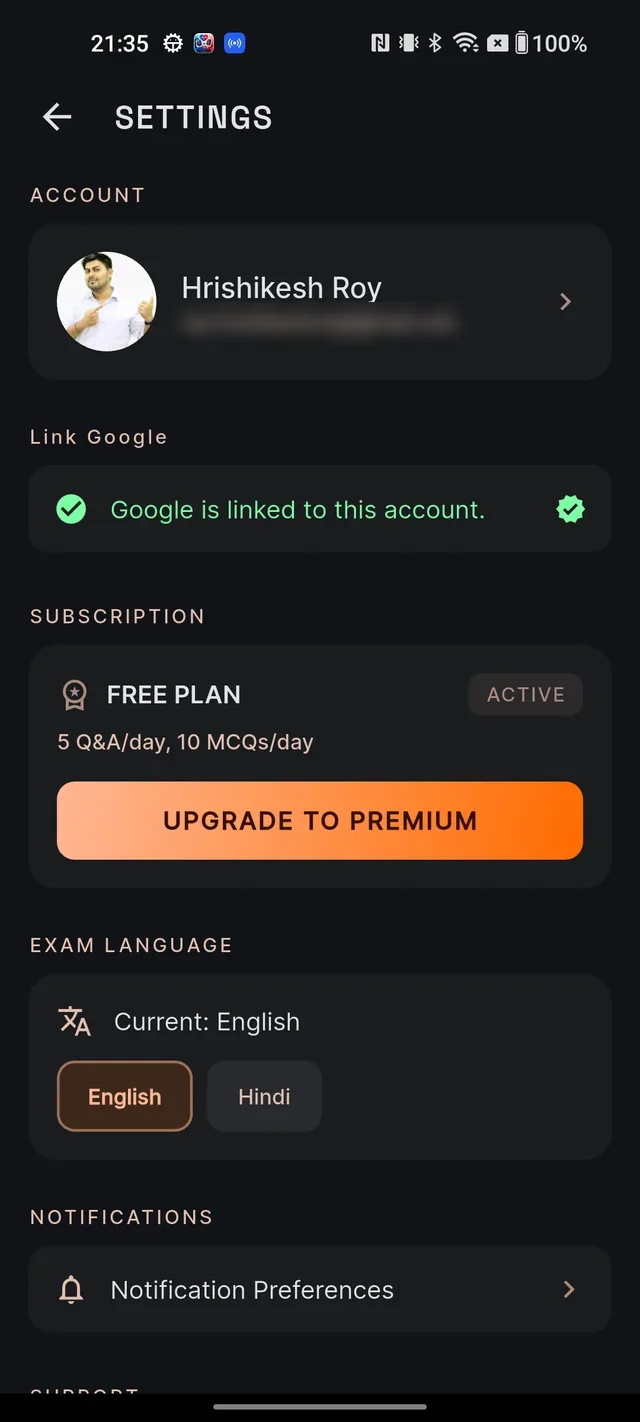
- From Home, tap your avatar (top-left) to open your Profile, then the gear icon (top-right) to open Settings.
- Under SUBSCRIPTION, tap UPGRADE TO PREMIUM.
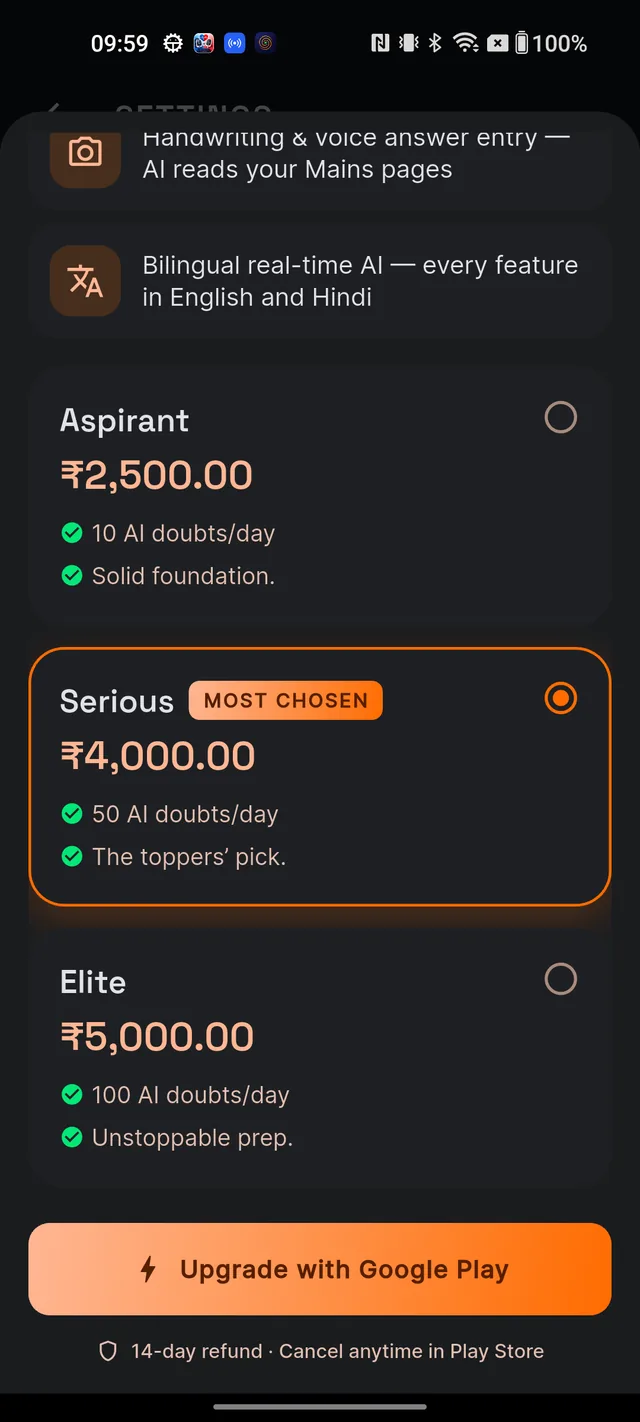
- A plan sheet slides up. Tap a card to choose Aspirant, Serious or Elite — Serious is pre-selected and carries the MOST CHOSEN badge. Not sure which one fits? See Free vs paid: what's included.
- Tap Upgrade with Google Play.
- The standard Google Play purchase sheet opens. Pay with the card or UPI saved to your Google account — Google handles the whole payment.
- Once the purchase is confirmed and verified, the PREMIUM ACTIVE welcome screen appears with your plan name and renewal date. Tap Continue and you are done.
If you change your mind and close the Google Play sheet, nothing happens — no charge, no error. If a payment goes through but the app briefly cannot confirm it, don't worry: the app retries automatically on the next launch, and you are never charged without eventually receiving your plan. UPI payments that wait for confirmation show a processing state and unlock on their own once Google confirms them.
Reinstalled the app or changed phones
There is no restore button — because you don't need one. Restore is automatic:
- Install Dooit and sign in to your Dooit account as usual.
- Make sure the phone is signed in to the same Google account that made the purchase.
- Open the app. Google Play re-delivers your active purchase in the background and your plan is granted again, usually within moments.
The same applies after a crash or when a purchase finishes while the app is closed — your tier appears on the next launch.
Manage, switch or cancel
Because Google Play owns the billing, every change happens in the Play Store:
- Open Settings and tap Manage subscription (this replaces the upgrade button once you are on a paid plan).
- On the Subscription screen, tap Manage in Play Store. The Play Store opens directly on your Dooit subscription.
- From there you can cancel, change your payment method, or switch to a different plan.
Two things worth knowing:
- Switching plans — move between Aspirant, Serious and Elite any time from the Play Store. Google pro-rates the difference automatically, so you never pay twice for the same days.
- Cancelling — you keep full access until the end of the period you have paid for. Cancelling only switches off the next renewal. Google's own guide is at Play Store help: cancel a subscription.
For refunds, renewals and what happens when a plan expires, see Billing FAQs & refunds.
Frequently asked questions
Where do I upgrade?
Open Settings (tap your avatar on Home, then the gear icon) and tap UPGRADE TO PREMIUM under SUBSCRIPTION. Pick a plan card and tap Upgrade with Google Play.
I reinstalled the app — how do I restore my subscription?
Just sign in and open the app. There is no restore button because restore is automatic: Google Play re-delivers your active purchase and your plan is granted again. Make sure your phone is on the same Google account that bought it.
How do I cancel?
Open Settings, tap Manage subscription, then Manage in Play Store, and cancel there. Billing is handled by Google Play, so cancelling inside the Play Store is the only way to stop renewals.
If I cancel today, do I lose access immediately?
No. You keep full access until the end of the period you have already paid for. Cancelling only stops the next renewal.
Can I switch from Aspirant to Serious mid-year?
Yes. Change your plan from the Play Store at any time — Google pro-rates the price difference automatically.
Why does the button say Play Billing not available?
Your device has no working Google Play services or no Google account signed in. Purchases in the app run through Google Play, so they need a Play-enabled Android device.
Didn’t find what you needed? We are a small team and we read every message.
Email supportBack to Help Center