Choose English or Hindi (exam medium)
Dooit is built for both English-medium and Hindi-medium aspirants. Your exam medium is one single choice that sets the language of the entire app — interface, AI coaching, MCQs, current affairs, plan and notes. Here is how to pick it, switch it, and what to expect.
Pick your medium when you first join
The very first onboarding step, Choose Your Medium, asks you to pick English or हिन्दी. As the screen explains, UPSC Mains can be written in either language, and this choice determines the language of your AI coaching, MCQ practice and study material. The step also reassures you: You can change your language later from Settings or when regenerating your study plan. See Set up your exam profile for the full setup walkthrough.
Switch your medium any time in Settings
- Tap your profile avatar on the Home screen, then the gear icon (top-right) to open SETTINGS.
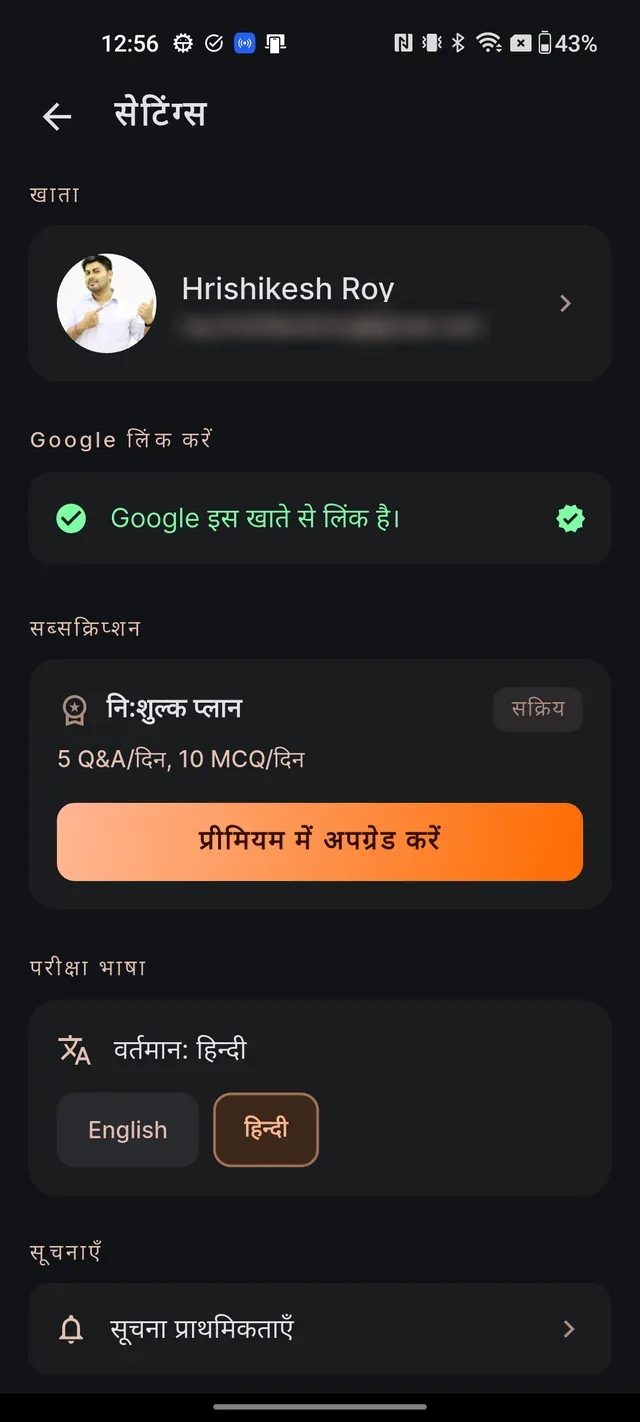
- Scroll to the EXAM LANGUAGE section. It shows your current language (for example "Current: English") with two chips: English and Hindi.
- Tap the other chip. The label changes to Saving language… with a spinner for a moment, and the whole app switches over.
Tapping the chip that is already selected does nothing. If saving fails, the selection springs back and a red message appears: Could not save language. Please check your connection and try again. — just retry once you are online.
What changes when you switch
Everything follows your medium as one package:
- The interface — menus, buttons and screens. There is no separate app-language setting; exam language is the only language control.
- AI answers — the AI tutor replies in your medium.
- MCQs — questions, options and explanations.
- Current affairs — articles are published in English and Hindi together, so the feed is complete in both languages.
- Study notes — titles, sections and bodies all render in your medium. Note titles also show the other language as a small sub-line underneath; that is deliberate, so Hindi-medium readers stay anchored to English nomenclature (and vice versa).
- Your study plan and the Exam Guide — both render in your medium automatically.
When you may still see some English
A few Hindi pieces are still being prepared, and Dooit prefers showing you something useful over showing nothing:
- Audio warm-ups: if a topic's Hindi audio does not exist yet, the English warm-up plays with the notice Hindi version coming soon — playing English warm-up for now. A few labels inside the audio player also remain in English for now.
- MCQs: some Hindi questions show a small badge, AI translation · review pending. It means our team's Hindi-medium expert review of that translation is still pending; the English source stays the canonical reference.
- Study notes: in the rare case one side of a note is missing, the other language's text is shown so you are never left with a blank section.
- A few stylistic labels (like some sign-in flavour text) are English-only by design.
None of these are errors — they resolve on their own as Hindi content keeps rolling out.
Frequently asked questions
Does switching the medium change the whole app or just the notes?
The whole app. Your exam language controls the interface, AI answers, MCQs, current affairs, your study plan and study notes together. There is no separate app-language setting.
Is there a separate setting for the app's interface language?
No. Exam language is the only language control in Dooit — interface, AI and content all follow it as one choice.
The language switch failed with a red message. What happened?
A connection problem. The selection springs back to your previous language. Check your internet and tap the chip again.
I am on Hindi medium but an audio warm-up played in English. Why?
Hindi audio is still rolling out for some topics. Until a topic's Hindi version exists, the English warm-up plays with a notice saying the Hindi version is coming soon.
Do MCQs work fully in Hindi?
Yes. Some Hindi questions carry a small badge reading "AI translation · review pending" — it means a Hindi-medium expert has not yet double-checked that translation, and the English source remains the reference.
Didn’t find what you needed? We are a small team and we read every message.
Email supportBack to Help Center