Delete your account & your data
You can permanently erase your Dooit account and everything in it, right from the app, in under a minute. The deletion is immediate and irreversible — so please read the two checks below before you type the magic word.
Before you delete: two things to check
- Cancel your subscription first (if you have one). Open the Play Store app, tap your profile picture, go to Payments & subscriptions → Subscriptions, choose Dooit and cancel. Step-by-step help is in Subscribe, manage & cancel.
- Be sure you mean it. There is no grace period, no recovery email, no undo. If you only want a break, just sign out instead — signing out keeps everything safe for your return.
Delete your account, step by step
- From Home, tap your avatar (top-left), then the gear icon to open Settings.
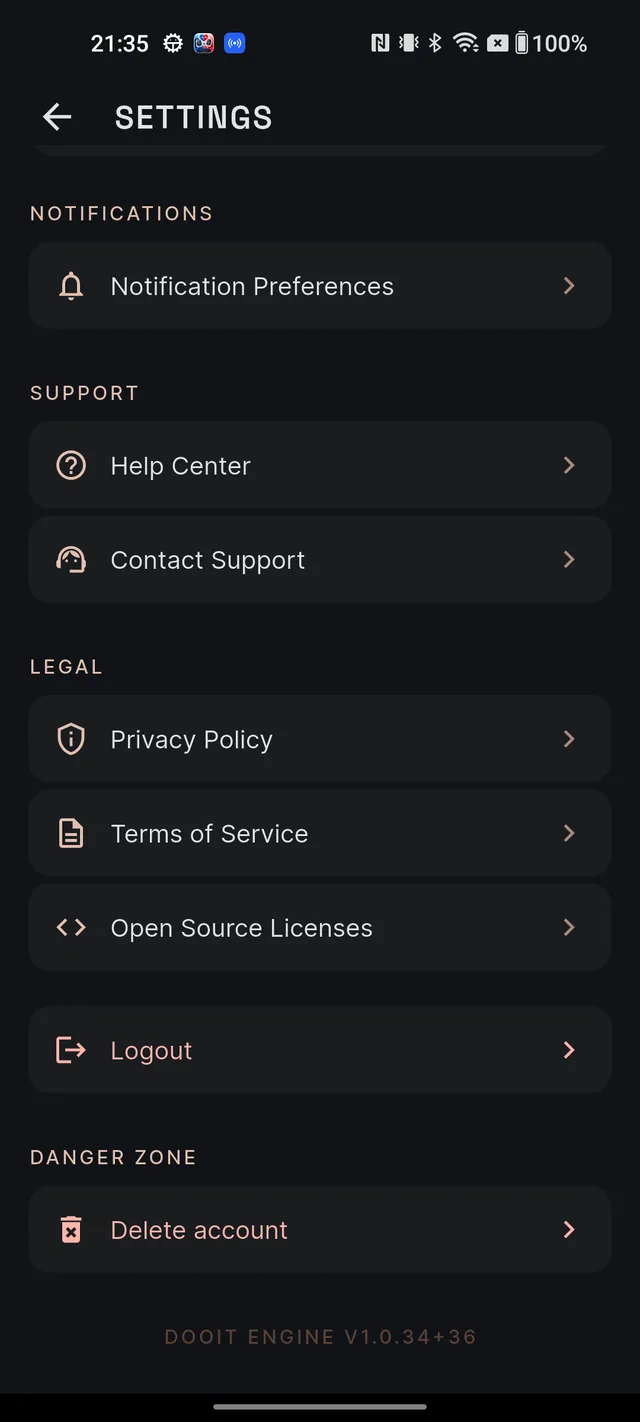
- Scroll to the very bottom, to DANGER ZONE, and tap Delete account.
- A dialog titled Delete account permanently? appears. Read it — it spells out exactly what will be removed.
- In the field labelled Type DELETE to confirm, type DELETE in capital letters. It is case-sensitive: lowercase will not work, and the red button stays disabled until the word is exact.
- Tap Delete forever. (Or Cancel — nothing happens until you confirm.)
- After a moment you will see "Your account has been deleted." and land on the sign-in screen. That's it — the account is gone.
If something goes wrong you will see "Could not delete account" with the reason, and you stay signed in — check your connection and try again, or use the email route below.
What gets erased
Deletion is immediate and removes everything tied to your account:
- Your profile and onboarding details (target year, optional subject, study hours)
- Q&A history, bookmarks and feedback
- MCQ attempts, quiz sessions and bookmarks
- Your study plan, daily tasks and study progress
- Current affairs bookmarks and notes
- Revision cards
- All Mains answers, attempts and evaluations
- Notification preferences and notification history, including this device's push registration
- Usage counters, subscription records and access logs
There is no 30-day holding period: the data is removed right away, in line with India's data-protection rules. Remember that the Google Play billing relationship is separate and survives the deletion — which is why cancelling first matters.
Questions about your data
If you would rather have us do it, or you have any question about your data, email roy@roydigital.in from your registered address and ask for a manual deletion. The in-app Privacy Policy (Settings → LEGAL) describes how your data is handled while your account is active — more on that screen in Your profile & settings.
Frequently asked questions
Can I undo a deletion?
No. Deletion is immediate and permanent — there is no grace period and no recovery. If you are unsure, sign out instead; your data stays safe.
Does deleting my account cancel my subscription?
No. Billing lives with Google Play, not with your Dooit account. Cancel the subscription in the Play Store first, or Google may keep charging you.
Why is the Delete forever button greyed out?
You must type DELETE in capital letters, exactly. Anything else — including lowercase delete — keeps the button disabled.
What exactly gets deleted?
Everything tied to your account: profile, study plan, daily tasks and progress, AI answers and Q&A history, MCQ history, bookmarks, notes, revision cards, Mains answers and evaluations, notification settings, usage records and subscription records. The deletion happens immediately.
Can support delete my account for me?
Yes. Email roy@roydigital.in from your registered email and ask for a manual deletion.
Didn’t find what you needed? We are a small team and we read every message.
Email supportBack to Help Center