Mains PYQs & the Daily Question
The Mains Workspace is your answer-writing practice room. It holds a bank of real UPSC Mains previous-year questions (PYQs) you can filter by paper and year, plus one curated daily question that every aspirant gets. This guide shows you how to find the right question to attempt today.
Open the Mains Workspace
- Open the app — you land on Home.
- Tap the Mains Workspace quick-action card (its subtitle reads Write Mains answers, get AI-graded feedback.).
- The workspace opens straight into the question browser — there is no separate menu screen.
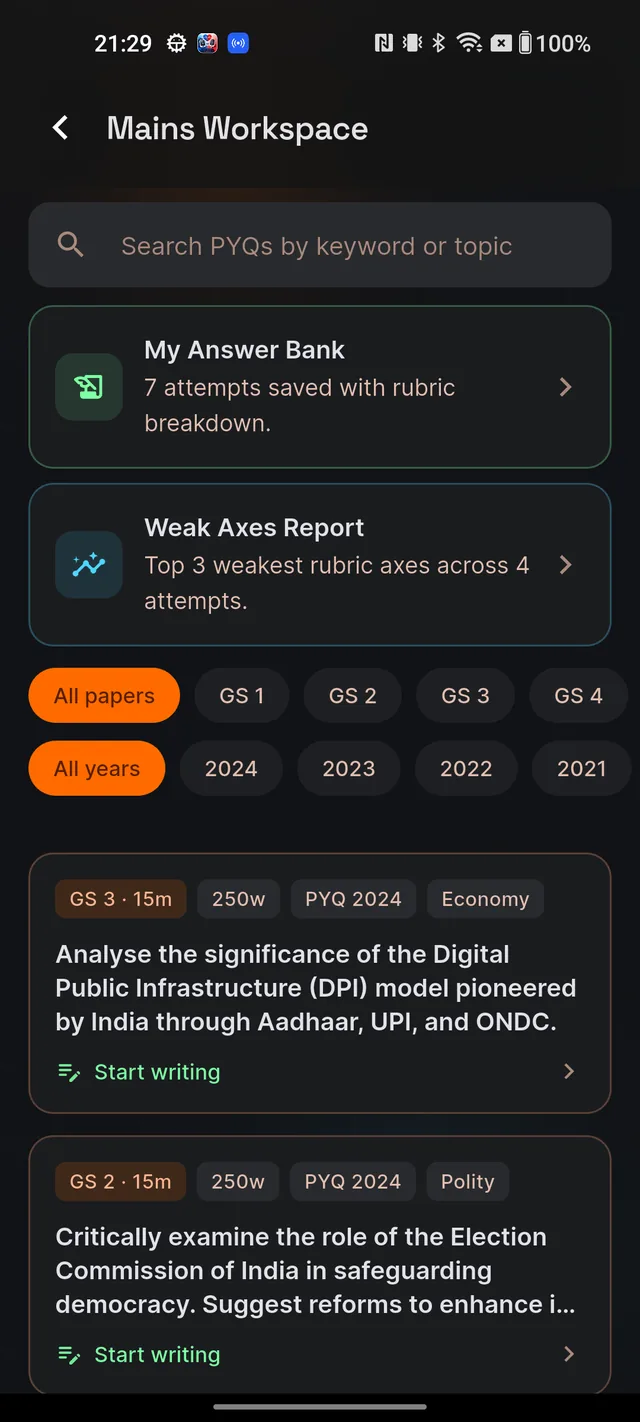
Above the question list sit two cards you will use later: My Answer Bank (every answer you have submitted, with its score) and Weak Axes Report (your improvement patterns — see The Weak Axes report). Their subtitles update live, for example "7 attempts saved with rubric breakdown."
Reading a question card
Each card in the list shows small tag pills, then up to three lines of the question, then a Start writing link. The pills tell you everything before you commit:
- Paper and marks — for example "GS 2 · 15m".
- Word limit — for example "250w".
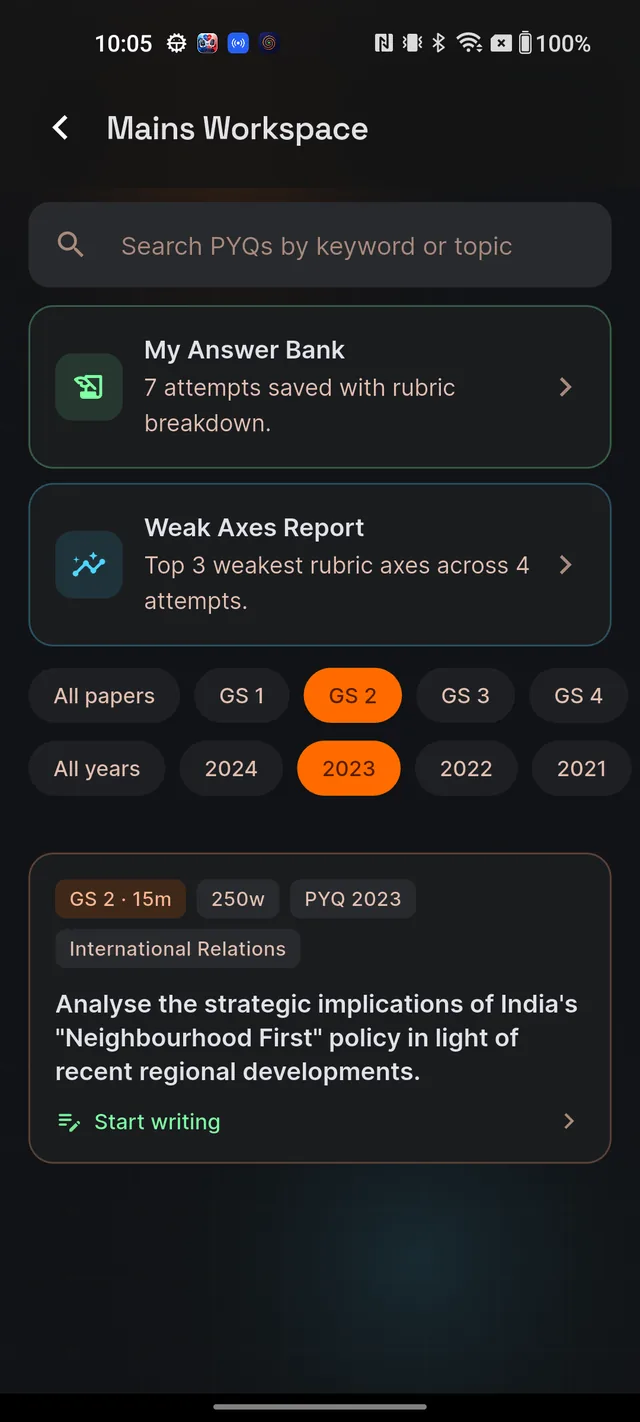
- PYQ year — a pill like "PYQ 2023" appears only on questions from real previous-year UPSC papers. No pill means it is a curated practice question.
- Topic — shown when the question has one, such as "Economy" or "Polity".
Tapping anywhere on the card opens the answer editor for that question — see Write your answer: typing, voice & photo. The list is sorted with the newest PYQ years first.
Filter by paper and year, or search
- Use the first chip row to pick a paper: All papers, GS 1, GS 2, GS 3, GS 4 or Essay.
- Use the second chip row to pick a year: All years or a specific year like 2024. Year chips only appear for years that exist in the bank.
- To find a theme, type into the search bar at the top (hint: Search PYQs by keyword or topic). A small × appears so you can clear it.
The chips stay pinned to the top while you scroll, and your filters are remembered if you leave and come back during the same session. If you narrow things too far you will see "No questions match these filters" — tap Clear filters to reset paper, year and search in one go.
TODAY'S MAINS — one question for everyone
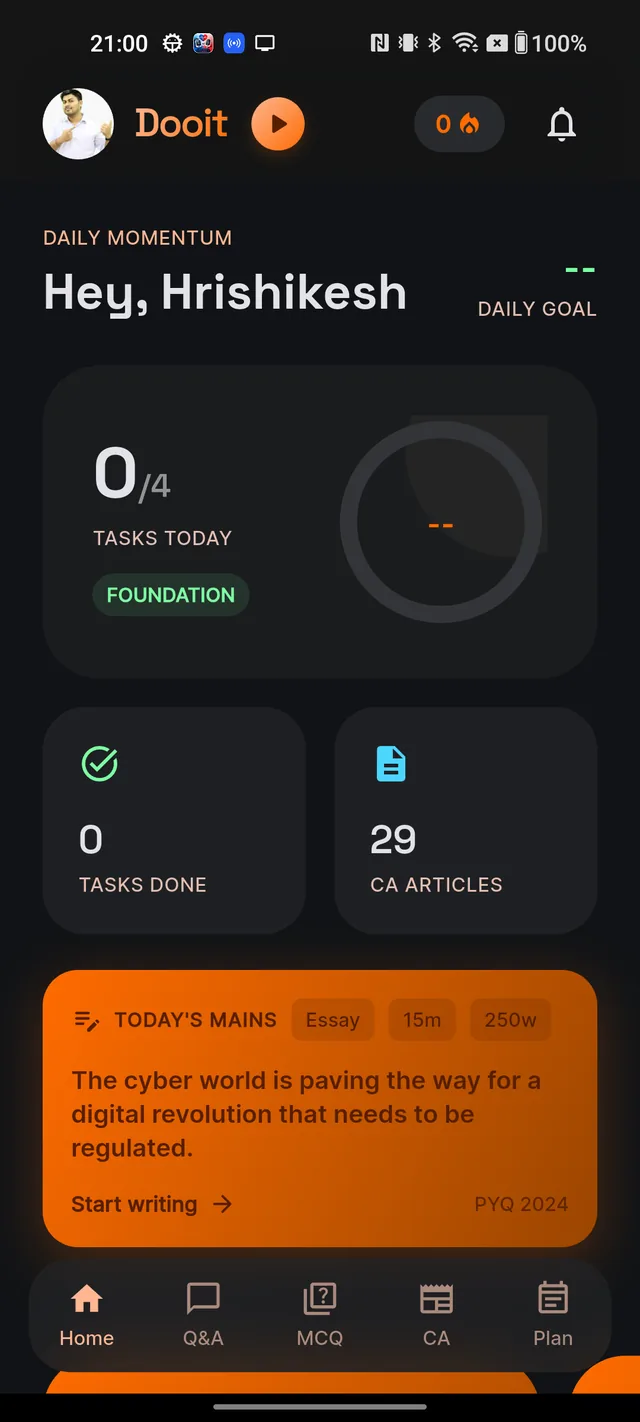
On the Home screen (not inside the workspace) you will find an orange card labelled TODAY'S MAINS. It shows the paper, marks and word-limit pills, the question text, a Start writing row, and a PYQ year in the corner when the pick is a real past question.
One question is curated per day, and it is the same for every user — the pick rotates across the GS papers and Essay, drawn from the existing question bank. Tapping the card skips the browser and takes you straight into the answer editor.
If today's pick is not ready yet (early morning, for instance), the card simply does not appear — no error, no placeholder. You can always reach every question through the Mains Workspace card instead.
Frequently asked questions
Where do I find previous-year Mains questions?
Open the app and tap the Mains Workspace card on Home. The workspace opens straight into the question browser. Questions taken from real UPSC papers carry a PYQ pill with the year, like PYQ 2023.
Can I filter Mains questions by topic?
There are no topic chips, but you can type the topic into the search bar at the top — for example "federalism" or "food security". It searches the full question text.
Why does a question have no PYQ tag?
Only questions from real previous-year UPSC papers carry the PYQ year pill. Questions without it are curated practice questions added to the bank.
Why did the TODAY'S MAINS card disappear from my Home screen?
Today's pick has not been published yet — it usually appears later in the day. The card simply hides until it is ready. The Mains Workspace itself stays fully usable the whole time.
Is the daily question personalised to me?
No. Everyone gets the same daily question on purpose, so you can attempt it alongside other aspirants and compare notes.
Didn’t find what you needed? We are a small team and we read every message.
Email supportBack to Help Center