The Mistakes Notebook
Every question you get wrong — or skip — in any quiz lands automatically in your Mistake Notebook, with a smart retry date attached. This guide explains the retry schedule in plain words, how to read a mistake card, and how to clear your backlog for good.
How mistakes get here
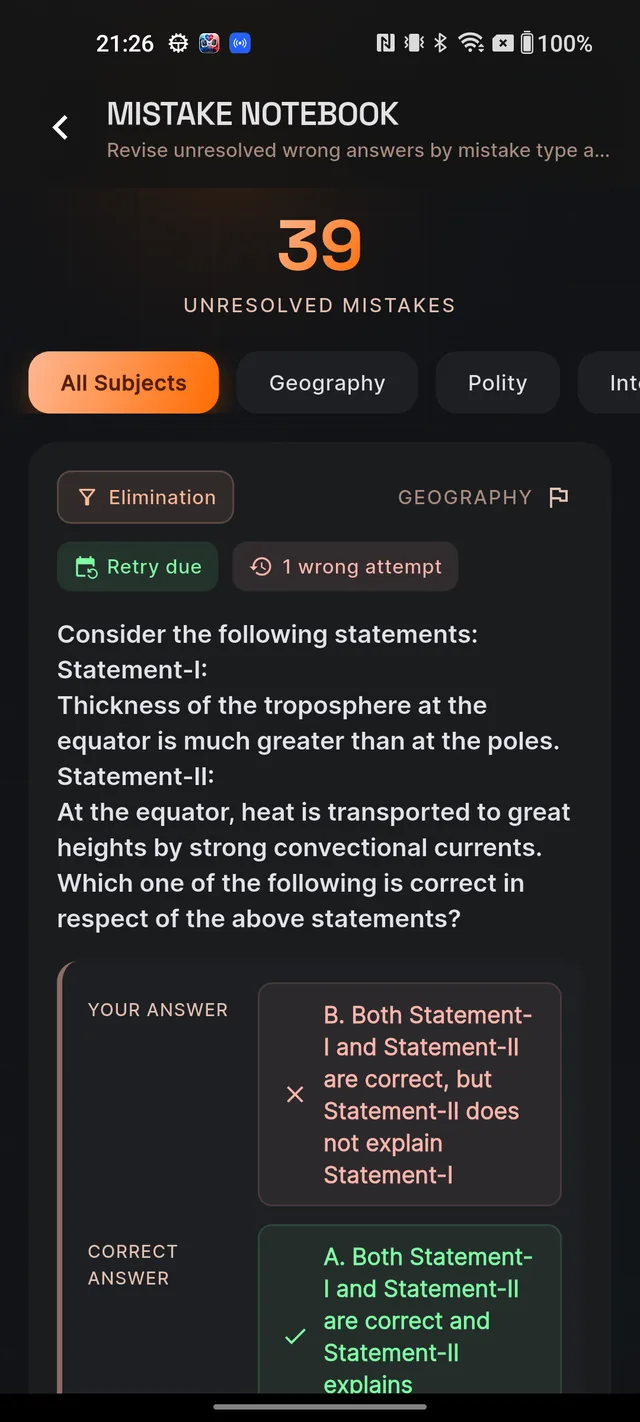
You never add anything manually. After every quiz, each wrong answer and each skipped question is saved to the notebook with a retry date. To open it, go to the MCQ tab and tap the Mistake Notebook card — its subtitle always shows how many unresolved mistakes you have. Inside, a big count sits under Unresolved mistakes, and if your mistakes span more than one subject, filter chips (All Subjects plus one per subject) let you narrow the list. Pull down to refresh.
A mistake stays in the notebook until you answer that same question correctly in a later quiz. That is the only way out — and it is the point: the notebook is your personal list of questions that still owe you a correct answer.
The retry schedule in plain words
Dooit does not ask you to retry everything tomorrow. Each mistake gets a retry date based on why you got it wrong:
- Careless slips and skipped questions come back the next day — you almost knew it, so a quick re-check is enough.
- Elimination and factual mistakes come back after 2 days — you need a short revision pass first.
- Conceptual gaps come back after about 3 days — enough time to re-read the topic from basics before retrying.
If you get the same question wrong again, the next retry moves about 2 days further out each time, but never beyond two weeks. Longer gaps on repeat mistakes are intentional — spacing the retries out is what makes the answer stick.
Reading a mistake card
Each card packs everything you need to revise without leaving the screen:
- A mistake-type chip — Conceptual, Factual, Careless, Elimination or Skipped — plus the subject.
- A retry chip: Retry due, Retry tomorrow or Retry in 3d-style countdowns, and a chip counting your wrong attempts on that question.
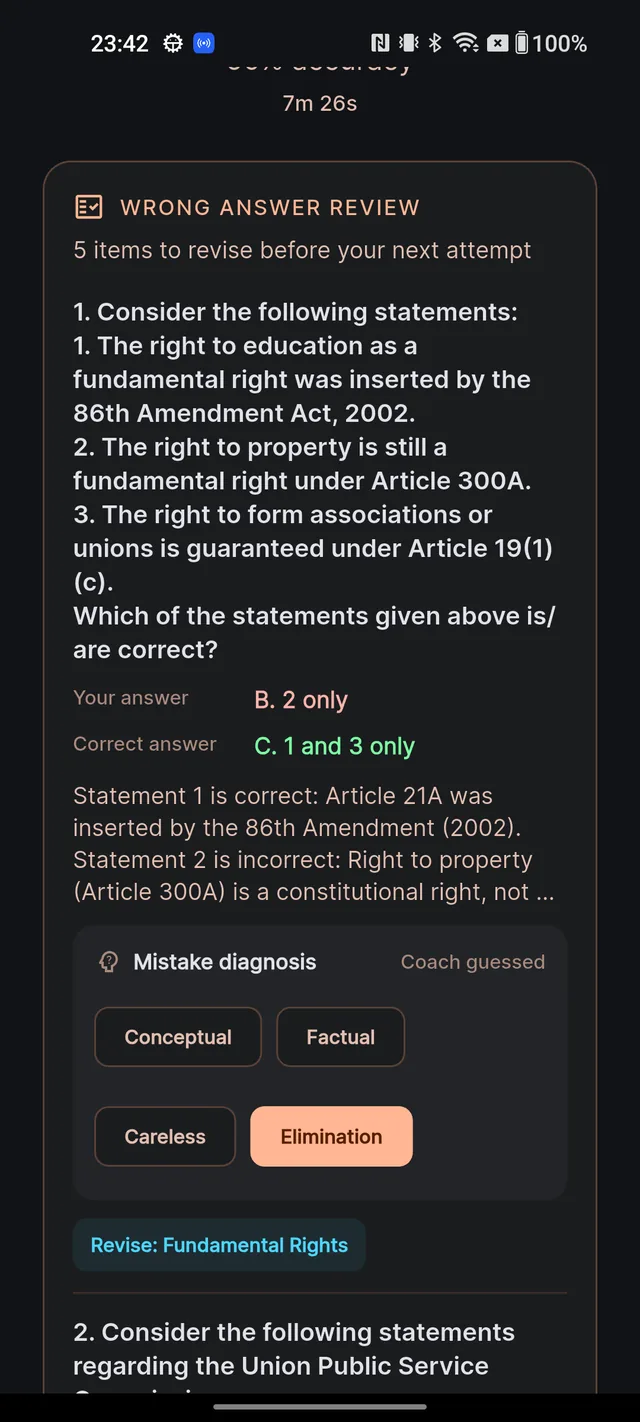
- The full question, a panel comparing Your answer (or Skipped) with the Correct answer, and the explanation.
- The Mistake diagnosis widget. Its header reads Coach guessed when the type was auto-classified from how you answered (a lightning-fast answer suggests carelessness, fact-heavy wording suggests a factual gap, and so on) or Confirmed by you once you have set it yourself.
Retrying: the RETRY TOPIC button
Each card ends with a Revise: … topic line and a RETRY TOPIC button, which starts a fresh quiz on that subject and topic. The button is enabled only when the retry is due. Before the due date it sits greyed out — that is the spaced-repetition schedule doing its job, not a bug. When the chip says Retry due, the button lights up and that is your cue:
- Open the MCQ tab and tap Mistake Notebook.
- Find a card whose chip reads Retry due.
- Skim the explanation once, then tap RETRY TOPIC to start a fresh quiz on that topic.
- Answer the original question correctly somewhere along the way and it disappears from your unresolved list.
When everything is cleared, the notebook shows No unresolved mistakes — the cleanest screen in the app, and worth chasing.
Frequently asked questions
How does a question get into the Mistake Notebook?
Automatically. Every wrong answer and every skipped question from any quiz is added, with a retry date scheduled for it.
How do I remove a mistake from the notebook?
Answer that same question correctly in a later quiz. It stays listed as unresolved until you do.
Why is the RETRY TOPIC button greyed out?
The retry is not due yet. The button unlocks on the scheduled retry date — that gap is deliberate spaced repetition, not a bug.
What do Conceptual, Factual, Careless, Elimination and Skipped mean?
They are the coach's diagnosis of why you got the question wrong — a missing concept, a missed fact, a rushed slip, a failed option-elimination, or a question you skipped.
Can I correct the coach's diagnosis?
Yes. Tap a different chip on the Mistake diagnosis widget and it changes from "Coach guessed" to "Confirmed by you". Confirming types also makes your analytics more reliable.
Why do my retry dates keep getting longer?
Each repeat wrong attempt on the same question pushes the next retry about two days further out, up to a maximum of two weeks.
Didn’t find what you needed? We are a small team and we read every message.
Email supportBack to Help Center