Weak topics & trends
Two screens turn your quiz history into a study strategy: Weak Topic Diagnosis tells you what to fix, and Trend Analytics tells you whether your fixing is working. This guide explains every number on both, and the simple loop for acting on them.
Weak Topic Diagnosis: what to fix
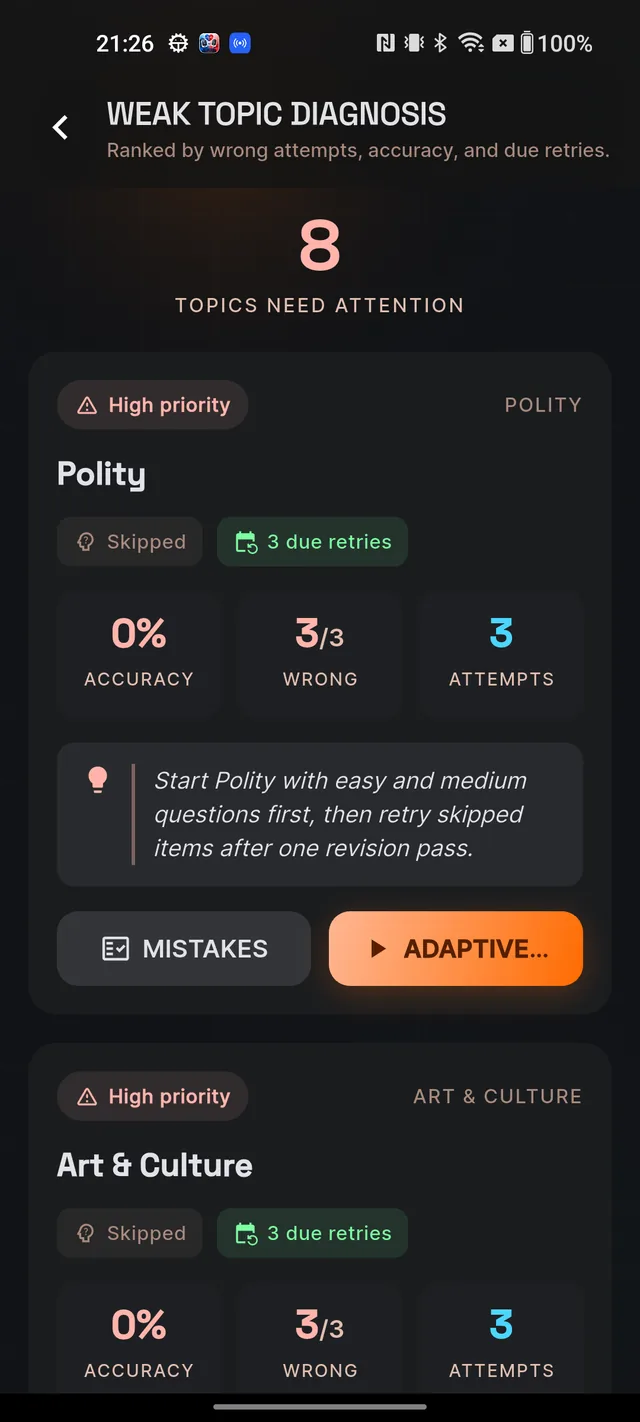
From the MCQ tab, tap the Weak Topic Diagnosis card. The screen is titled WEAK TOPIC DIAGNOSIS and, as its subtitle says, topics are Ranked by wrong attempts, accuracy, and due retries. A count under Topics need attention sums it up.
Each weak-topic card shows:
- A severity chip — High priority (red), Medium priority or Low priority — plus the subject and topic name.
- Your dominant mistake type on that topic and, when retries have come due, a due retries count.
- Three stat tiles: Accuracy (your percentage on that topic), Wrong (wrong answers out of attempts) and Attempts.
- A coach callout tailored to the mistake type — for a conceptual weakness it tells you to re-read the topic from basics before drilling; for carelessness it tells you to slow down and read every qualifier.
- Two buttons: MISTAKES jumps to that topic's entries in the Mistakes Notebook, and ADAPTIVE DRILL starts a targeted quiz (its header reads WEAKNESS DRILL).
The drill picks its own difficulty: conceptual or skip-heavy weaknesses start with easy questions to rebuild from basics, careless and elimination patterns get medium, and low-priority topics get hard. So an easy-looking drill is not the app going soft on you — it is sequencing.
If you see No weak topic detected yet, that is not a clean bill of health — it means there is not enough practice data yet. Attempt more MCQs across subjects and the signals will appear.
Trend Analytics: is it working
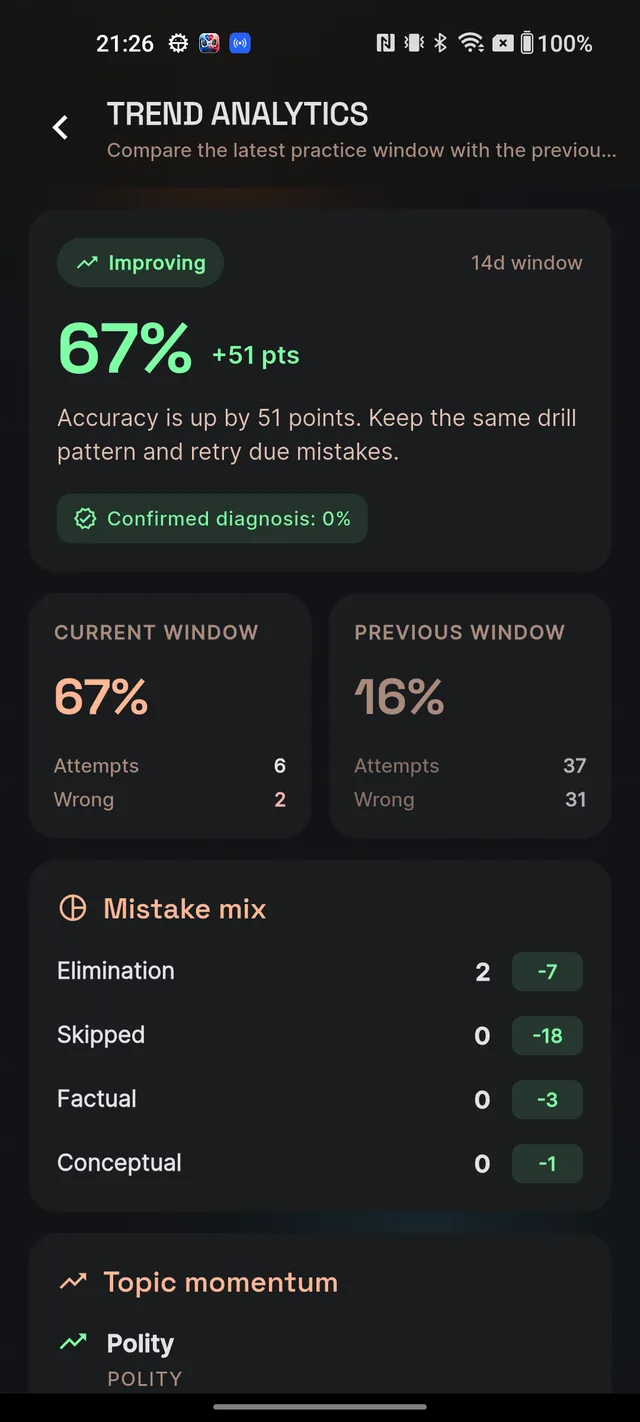
From the MCQ tab, tap Trend Analytics. The screen compares your latest practice window — a recent block of days, with the length shown on a chip like 7d window — against the equal-length block just before it. You are only ever measured against your own previous self.
Top to bottom:
- Summary card — a trend chip (Improving, Declining, Stable or Need more data), your current-window accuracy as the big number, and a signed delta like +6 pts against the previous window. A coach line underneath turns the verdict into an instruction — for example, when accuracy is down it tells you to pause new topics and clear your top weak-topic drill first.
- Confirmed diagnosis chip — the percentage of your mistakes whose type you confirmed yourself. Higher means the analytics trust your data more, which is one more reason to confirm types in the Mistake Notebook.
- Current window vs Previous window cards — accuracy, Attempts and Wrong for each block, side by side.
- Mistake mix — one row per mistake type with its current count and a signed change badge: red means that mistake type increased versus the previous window, green means it decreased.
- Topic momentum — per-topic trend arrows (up, down or flat) with pills for that topic's accuracy and the change in wrong answers.
If the screen says Not enough trend data, attempt MCQs across two practice windows — at least 5 in each — and the comparison unlocks.
How to act on these numbers
A simple weekly loop covers it:
- Open the Mistakes Notebook first and clear every card marked Retry due — due retries are also part of what makes a topic rank as weak.
- Open Weak Topic Diagnosis and run the ADAPTIVE DRILL on your top High priority topic. Follow the coach callout — if it says re-read the basics first, do that before drilling.
- Check Trend Analytics once or twice a week, not daily. Declining means pause new topics and keep clearing weaknesses; Stable means raise the difficulty gradually; Improving means keep your current pattern.
- In Topic momentum, attack the topics with a downward arrow first — pair each one with its drill from Weak Topic Diagnosis.
Frequently asked questions
How does Dooit decide a topic is weak?
Topics are ranked by your wrong attempts, your accuracy and how many overdue retries you have on that topic. Enough practice data across subjects is needed before signals appear.
What is an ADAPTIVE DRILL?
A quiz targeted at one weak topic, with the difficulty chosen automatically to match your mistake pattern on it.
Why did my drill start with easy questions?
When a high-priority weakness is conceptual or full of skips, the drill rebuilds from basics first. Careless and elimination weaknesses get medium questions; low-priority topics get hard ones.
What is a practice window?
A recent block of days compared against the equal-length block just before it. The Trends screen judges you only against your own previous window.
What does "Confirmed diagnosis" mean on the Trends screen?
The share of your mistakes whose type you confirmed yourself in the Mistake Notebook. The higher it is, the more the analytics can trust your data.
What does a red number in Mistake mix mean?
That mistake type increased compared with your previous window. Green means it decreased.
Didn’t find what you needed? We are a small team and we read every message.
Email supportBack to Help Center