Recalibrate your plan
Life changes — a new target year, fewer free hours, a different optional. Recalibrating rebuilds your plan from today onwards around your updated answers, while your completed history stays intact. It is the one planner action with a daily limit, so this guide also explains exactly how that works.
When to recalibrate
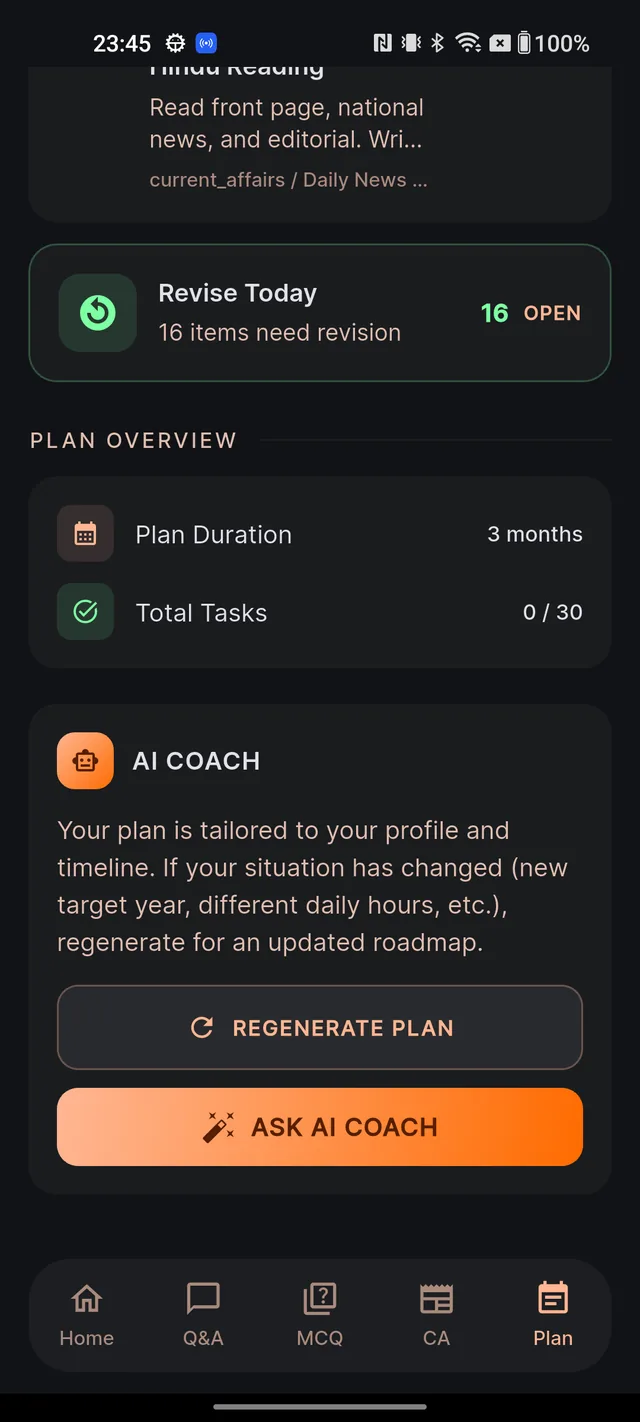
The AI COACH card at the bottom of the Plan tab puts it well: your plan is tailored to your profile and timeline, so if your situation has changed, regenerate for an updated roadmap. Good reasons:
- You changed your target exam year (postponed or advanced your attempt).
- Your daily study hours went up or down — new job, college exams, more free time.
- You switched your optional subject or your exam language.
- You have drifted far enough from the plan that a fresh start from today feels cleaner than catching up.
How to regenerate, step by step
- Open the Plan tab and scroll to the AI COACH card.
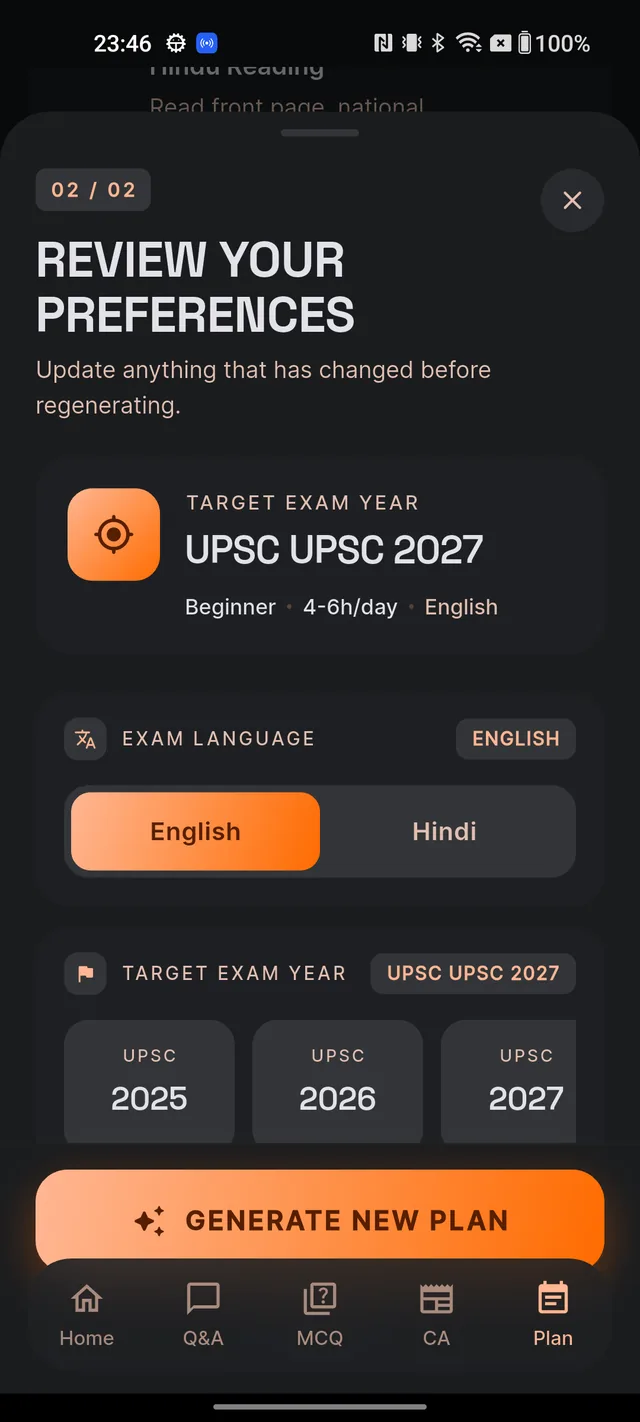
- Tap REGENERATE PLAN. A sheet titled REVIEW YOUR PREFERENCES slides up, pre-filled with your current answers.
- Update anything that has changed: EXAM LANGUAGE, TARGET EXAM YEAR, PREPARATION STAGE, DAILY STUDY HOURS and OPTIONAL SUBJECT.
- Read the warning box — it reminds you that your current plan will be archived and a new plan generated from these preferences.
- Tap GENERATE NEW PLAN (or CANCEL to back out).
- The button shows a spinner with GENERATING NEW PLAN..., and the app-wide status banner takes over — the same orange/green/red banner described in Generate your AI study plan. You can keep using the app; it usually finishes in under a couple of minutes.
What regeneration actually changes
- A brand-new plan replaces the active one. The old plan is archived, not deleted.
- Today's task list is re-seeded from the new plan — fresh tasks appear in Today's tasks right away.
- Your completed history is kept. The work you already logged stays with you; it is the roadmap ahead that gets rebuilt.
- The plan length is recalculated from today to your (possibly new) Prelims date — months remaining, counted down, never padded.
Limits — how many refreshes you get
| Account | First plan | Plan regeneration |
|---|---|---|
| Free | Free for everyone | Small daily allowance during our launch period — can change; your existing plan keeps working forever |
| Paid (any tier) | Free for everyone | 1 per day guaranteed, resets at midnight IST |
Once the day's regeneration allowance is used, attempting another shows a friendly screen letting you know a refresh is not available right now and when the limit resets — your existing plan is untouched and stays fully usable until midnight IST brings a fresh allowance.
If you want guaranteed daily recalibration, you can upgrade any time from Settings → UPGRADE TO PREMIUM (billed through Google Play). See Free vs paid for the full comparison.
If it fails — and the five-minute grace
- Failure is free to retry. If generation fails, the red banner reads Plan generation failed — tap to retry. Tap it and a fresh attempt is queued — a failed run does not burn your daily refresh.
- Double-taps are harmless. If you tap generate again within five minutes of a finished generation — say you were not sure it worked — Dooit returns the same fresh plan without using another refresh.
Frequently asked questions
How often can I regenerate my plan?
Paid plans guarantee one plan regeneration per day; the allowance resets at midnight IST. Free accounts also get a small daily allowance during our launch period. When a refresh is not available, a friendly screen lets you know — your existing plan stays untouched.
Will regenerating delete my progress?
No. Your completed-task history is kept; it is the day-by-day roadmap ahead of you that gets rebuilt. Your old plan is archived, not erased.
I tapped generate twice — did I use two refreshes?
No. If you tap generate again within five minutes of a finished generation, Dooit simply hands you the same fresh plan back without using another refresh.
Does regenerating with the same preferences do anything?
Yes — it still builds a brand-new plan from today onwards (and still uses your daily refresh), recalibrated to the time now remaining. It is not a no-op.
What if regeneration fails?
A red banner reads "Plan generation failed — tap to retry". Tap it to queue a fresh attempt — a failed attempt does not cost you a refresh.
Didn’t find what you needed? We are a small team and we read every message.
Email supportBack to Help Center